
Big Mumbai Login – Complete Account Access Information for Users
Big Mumbai Login process is an important topic for users who want to know how account access works on the Big Mumbai platform. Whether someone is accessing the website for the first time or returning to an existing account, understanding the general login procedure can help avoid common mistakes and improve account security.
Disclaimer: Bigmumbai.ai.in is an independent informational website. It is not the official Big Mumbai platform and is not affiliated with, endorsed by, or operated by its owners. Website availability, login procedures, account policies and features may change. Always verify information through the platform’s actual authorized channels.
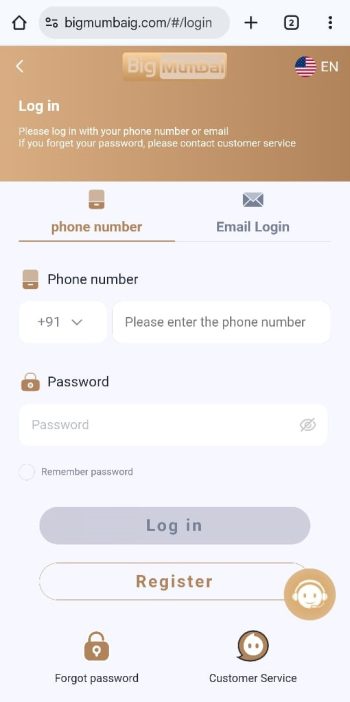
Big Mumbai Login Page
Users researching the Big Mumbai login procedure should follow these general account-access precautions:
- Open the verified website address “www.bigmumbai.ai.in” using a trusted browser.
- Check the domain name carefully before proceeding.
- Locate the login option, if available.
- Enter the credentials associated with your registered account.
- Complete any additional verification requested by the platform.
- Review the website’s security information before continuing.
The exact procedure may vary depending on the current website version and its authentication system.
Big Mumbai Login Requirements
Before attempting to access an existing account, users may need the following information:
- A registered mobile number or username, depending on the login system.
- The correct account password.
- Access to the registered mobile number if additional verification is required.
- A stable internet connection.
- An updated web browser or compatible device.
Never share your password or OTP with another person claiming to provide account assistance.
Big Mumbai Login Problems and Possible Solutions
Sometimes users experience difficulty accessing an account. The following table explains common login-related problems and general troubleshooting steps.
| Login Problem | Suggested Action |
|---|---|
| Incorrect password | Check the entered password and keyboard settings. |
| OTP not received | Verify mobile network availability and wait before requesting another OTP. |
| Website not loading | Check your internet connection and try again later. |
| Account verification issue | Follow the platform’s authorized verification procedure. |
| Browser error | Update your browser or clear its cache. |
| Suspicious login activity | Stop attempting access and use verified support channels. |
1. Incorrect Password
An incorrect password message may appear when the entered credentials do not match the registered account information.
Check spelling, uppercase and lowercase letters, and accidental spaces. If the password has been forgotten, use the platform’s verified recovery process if available.
2. OTP Verification Problems
An OTP may be required as an additional security step. If the message does not arrive, check mobile network connectivity and confirm that the registered number is correct.
Do not share verification codes with anyone.
3. Website Not Opening
A login page may become temporarily unavailable because of maintenance, network problems or browser compatibility issues.
Users can check their internet connection, update their browser and try again after some time. Avoid downloading unknown applications or using unofficial mirror websites.
How to Recover a Forgotten Big Mumbai Password
If a user cannot remember an existing account password, the safest approach is to use the password recovery option provided by the verified platform, if available.
General recovery precautions include:
- Confirm that the website address is legitimate.
- Locate the password recovery option.
- Follow the displayed verification instructions.
- Create a strong and unique password if a reset is permitted.
- Do not disclose OTPs or password-reset links to third parties.
If no recovery option is available, consult the platform’s authorized support channel.
Big Mumbai Login Security Tips
Account security should always be a priority when using online platforms.
Consider these precautions:
- Use a unique password that is difficult to guess.
- Never share login credentials with strangers.
- Avoid signing in through suspicious links received in messages.
- Do not save passwords on shared or public computers.
- Keep your mobile device and browser updated.
- Review account activity when security information is available.
- Avoid installing APK files from unknown sources.
Remember that legitimate support representatives should not need your complete password or OTP.
Big Mumbai Login on Mobile Devices
Users may access websites through smartphones, depending on the platform’s current compatibility.
For a better browsing experience:
- Use an updated mobile browser.
- Maintain a stable internet connection.
- Avoid opening multiple suspicious login pages.
- Check the website address before entering account details.
- Do not grant unnecessary permissions to downloaded applications.
Mobile access options and application availability should be confirmed through verified platform information.
Is Big Mumbai Login Available 24/7?
Login availability depends on the platform’s server status, maintenance schedule and technical operations.
Even if a website is accessible throughout the day, temporary interruptions may occur. Users should check verified announcements for information about maintenance or service interruptions.
This independent guide does not provide real-time confirmation of Big Mumbai server availability.
Frequently Asked Questions About Big Mumbai Login
1. What is Big Mumbai Login?
Big Mumbai Login refers to the account authentication process used to access an existing account associated with the Big Mumbai platform.
2. What information is required for Big Mumbai Login?
Depending on the current login system, users may need a registered mobile number or username, password and additional verification.
3. What should I do if I forget my Big Mumbai password?
Use the password recovery facility provided by the verified platform, if available. Follow its authentication instructions and never share verification codes.
4. Why is my Big Mumbai Login not working?
Possible reasons include incorrect credentials, network interruptions, browser issues, temporary server maintenance or account verification requirements.
5. Can I access Big Mumbai through a mobile browser?
Mobile browser access depends on the platform’s current website compatibility and availability.
6. Is it safe to use third-party Big Mumbai Login links?
Users should be cautious with third-party links. Verify the domain independently before entering credentials or sharing personal information.
7. Is bigmumbai.ai.in the official Big Mumbai Login website?
Bigmumbai.ai.in is an independent informational website. It does not operate or authenticate Big Mumbai user accounts.
8. Does bigmumbai.ai.in provide account recovery?
No. This website provides educational information only. Users should contact the platform through its verified support channels for account-specific assistance.
Explore More Big Mumbai Guides
Readers can explore the following informational topics to understand different aspects of the platform:
- Big Mumbai Registration: General information about account creation.
- Big Mumbai App Download: Application installation and compatibility information.
- Big Mumbai Gift Code: An overview of promotional codes and related terms.
- Big Mumbai Deposit Guide: General information about payment procedures and precautions.
- Big Mumbai Withdrawal Guide: Important considerations about withdrawal policies and transaction safety.
- Big Mumbai Responsible Gaming: Information about financial awareness and responsible participation.